

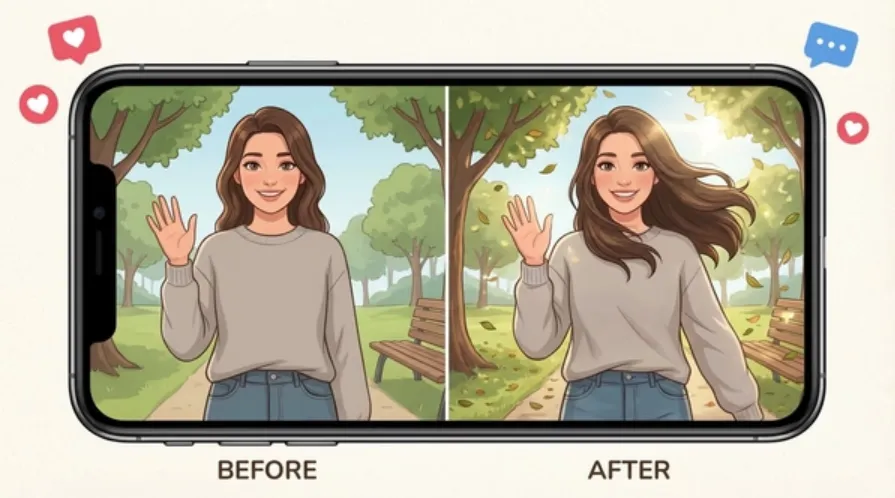
As of mid-2026, AI video synthesis has shifted from a novelty to an essential workflow component for digital marketers, media creators, and game developers. Animating static artwork, product photos, or concept art into smooth video clips used to require complex motion graphics pipelines. Today, generative motion tools let you turn any still photo into high-definition video within seconds.
After spending weeks testing the top platforms in production environments, I evaluated the leading platforms on output quality, control mechanisms, rendering speed, and pricing fairness. Here is the definitive roundup of the best free image to video ai tools available in 2026.
At a Glance: Top Image to Video AI Generators
|
Tool |
Primary Use Case |
Free Tier Availability |
Starting Paid Plan |
Key Differentiator |
|
Magic Hour |
All-in-one content creation & multi-step workflows |
Very Generous (Daily credits, no credit card required) |
$10/mo (billed annually) or $15/mo |
Full creative stack, frontier models, no concurrency caps |
|
Runway (Gen-2 / Gen-3) |
Advanced camera control & cinematic effects |
Limited trial credits |
$12/mo |
Granular motion brush controls |
|
Pika |
Expressive micro-animations & stylized video |
Free daily allocations |
$10/mo |
Creative scene modifications & lip syncing |
|
Luma Dream Machine |
Realistic camera movements & high physics accuracy |
Free access with queue limits |
$9.99/mo |
Strong spatial consistency |
|
Haiper AI |
Fast iterative drafting & social clips |
Free daily generation tier |
$8/mo |
Simple prompt-to-video controls |
The Top 5 Image to Video AI Tools
1. Magic Hour
Magic Hour stands out as the most versatile, high-value platform for creators who need professional-grade output without getting bogged down in fragmented software setups. Instead of isolating single capabilities, it offers an end-to-end studio where creators can jump seamlessly between tasks.
When you convert stills into video, you get direct access to leading frontier models under one roof. The platform shines when building complete sequences: you can upload an artwork asset, apply an image to video ai workflow, fine-tune facial movements using precise lip sync tools, and upscale the final render to 4K all in a single unified pipeline.
For creators working with human characters, Magic Hour provides best-in-class performance for face swap applications and talking photos, maintaining strict facial symmetry and temporal consistency across frames.
Pros:
· Unusually generous free tier with no credit card required to try.
· Parallel generations: No concurrency caps, letting you queue multiple takes simultaneously.
· Credits never expire on paid plans, ensuring you keep the value you buy.
· One-click multi-step workflows: Effortlessly go from raw image to high-res video.
· Cross-platform utility: Fully optimized for both desktop browsers and mobile devices.
· Direct founder-level support responses for technical troubleshooting.
Cons:
· Deep feature set can present a slight learning curve for total beginners.
· High-volume API users may require dedicated enterprise bandwidth setup.
Evaluation:
If you want an engine that combines multiple state-of-the-art models with rapid iteration speeds, Magic Hour is hard to beat. Its template ecosystem eliminates repetitive prompt engineering, making it my primary recommendation for agile marketing teams and independent creators.
Pricing:
· Free Plan: $0 with generous initial credits to test all main features.
· Creator Plan: $15/month (or $10/month billed annually).
· Pro Plan: $39/month for heavy creation workloads.
2. Runway (Gen-3 Alpha)
Runway remains a heavyweight in the professional film and post-production ecosystem. Its flagship motion generation models excel at interpreting camera direction commands such as pans, tilts, and zooms applied directly to still images.
Pros:
· Precise spatial control using Motion Brush capabilities.
· High frame-rate consistency on complex background movements.
· Strong integration with professional post-production workflows.
Cons:
· Free tier credits deplete very quickly.
· Pricing structure scales rapidly for high-resolution exports.
Evaluation:
If you are a cinematic director who needs precise director-style camera controls over specific image coordinates, Runway offers exceptional precision.
Pricing:
· Free: 125 one-time credits.
· Standard: $12/month per user (billed annually).
· Pro: $28/month per user.
3. Pika
Pika focuses heavily on making creative video edits accessible and fun. It excels at taking static photos and animating specific regions, such as adding blowing wind to hair, flowing water to a landscape, or dynamic lip movements to characters.
Pros:
· Great intuitive controls for expanding video canvasses.
· In-canvas editing tools allow quick visual adjustments.
· Clean, consumer-friendly interface.
Cons:
· Render times can lag during peak server traffic.
· Occasional visual warping on fine textures.
Evaluation:
For social media managers who need quick, expressive clips derived from existing brand graphics, Pika provides a solid blend of speed and playful control.
Pricing:
· Basic: Free with daily credit top-ups.
· Standard: $10/month.
· Pro: $58/month.
4. Luma Dream Machine
Luma Labs introduced Dream Machine to solve spatial awareness issues in video generation. When converting an image to video, it builds a believable 3D understanding of the scene, maintaining physics-based continuity when the camera moves through space.
Pros:
· Outstanding realistic lighting changes across animated frames.
· Accurate rendering of complex object physics.
· High visual fidelity on macro photography inputs.
Cons:
· Strict rendering queues during periods of high platform demand.
· Limited suite of surrounding post-processing tools.
Evaluation:
When your original image requires dramatic camera swoops or complex perspective shifts, Luma delivers realistic spatial continuity.
Pricing:
· Free: Limited monthly generations.
· Standard: $9.99/month.
· Plus: $29.99/month.
5. Haiper AI
Haiper AI provides a streamlined canvas designed for prompt-assisted video creation. It allows creators to take static visuals and define motion parameters through simple text overlays or motion vector controls.
Pros:
· Simple, clutter-free user interface.
· Decent baseline motion consistency for simple objects.
· Accessible pricing structure for beginners.
Cons:
· Artifacts can appear in intricate background details.
· Lacks deep multi-step editing pipelines.
Evaluation:
Haiper is ideal for creators who want a straightforward, no-nonsense tool for basic image animation without navigating heavy settings menus.
Pricing:
· Free: Basic daily generation credits.
· Pro: $8/month.
How We Chose These Tools
To build this list, I evaluated over fifteen motion-synthesis platforms over a four-week testing window. My evaluation criteria focused on practical production demands rather than marketing claims:
1. Motion Consistency: Does the tool preserve the key visual details of the source image without introducing strange visual distortions?
2. Workflow Speed: How quickly can a creator move from an initial upload to a finished export? Tools featuring multi-step actions like instantly pairing a generated video with clean audio or high-resolution upscaling scored significantly higher.
3. Price-to-Value Ratio: Free tiers were tested for true usability rather than restrictive paywalls. Paid tiers were evaluated based on cost per generated second and credit rollover rules.
4. Reliability at Scale: Platforms were tested during peak hours to evaluate queue latency, rendering stability, and system performance.
Market Trends in Image to Video AI
The AI motion landscape has matured rapidly in 2026. Here are the three primary trends shaping how creators use these tools:
· Unified Content Pipelines: Creators no longer want single-use tools. The market is shifting toward consolidated platforms where you can move from a simple asset to an ai image editor, apply video motion, and run facial alignment in a single interface.
· Parallel Execution Needs: As marketing teams run multivariate ad tests, waiting for sequential renders is a major bottleneck. Platforms supporting concurrent, multi-take generations have become standard for professional teams.
· Frontier Model Convergence: Rather than relying on a single proprietary engine, leading platforms now aggregate access to multiple frontier models, letting users pick the ideal algorithm for their specific visual style.
Final Takeaway
Choosing the right image-to-video AI platform depends on your specific production goals:
· For maximum workflow efficiency, frontier model variety, and an all-in-one studio that pairs video generation with high-level facial editing and upscaling, Magic Hour is the top overall choice.
· For granular motion-brush camera positioning on single cinematic frames, Runway is a strong option.
· For quick social media micro-animations, Pika offers a simple entry point.
I recommend testing your assets on a free tier first to evaluate motion response before committing to a paid tier.
Frequently Asked Questions
What is the best free image to video AI generator?
Magic Hour offers one of the most practical free tiers available, giving users access to high-resolution outputs, versatile model options, and additional multi-step tools without forcing immediate paid upgrades.
Can I convert static portraits into talking videos?
Yes. By combining image-to-video capabilities with lip sync and face swap models, platforms like Magic Hour allow you to animate still character portraits into fully lip-synced video sequences.
Do image to video AI credits expire?
Expiration rules depend on the platform. While many platforms reset unspent credits at the end of each billing cycle, services like Magic Hour allow paid credits to roll over without expiring, providing better long-term value for variable workloads.
